Recently, some iPhone users have reported receiving a so-called "Moo Virus", "Moo Moo Virus", or "Cow Virus" that causes their iPhone screen to zoom in, invert colors, and play a mooing cow sound unexpectedly.
Fortunately, this is not a real virus. In most cases, it is a malicious or prank shortcut created using Apple's Shortcuts app. The shortcut automatically changes certain iPhone settings, making users believe their device has been infected with malware.
If your iPhone suddenly starts zooming in, changing screen colors, or playing strange sounds, this guide will help you remove the shortcut and restore your iPhone settings to normal.
Is the Moo Virus a Real iPhone Virus?
No. The Moo Virus is not an actual virus or malware.
It is typically a custom shortcut created with the Shortcuts app. The shortcut contains a series of automated actions that can change accessibility settings, adjust display options, play sounds, and perform other tasks on the device.
Why Did My iPhone Get the Moo Virus?
Because these shortcuts can be shared through iCloud links, AirDrop, Messages, email attachments, or files, users may accidentally install and run them without realizing what they do. The issue usually occurs after installing or running a shared shortcut from another person.
Shortcuts are designed to automate multiple tasks with a single tap. While most shortcuts are useful and harmless, some prank or malicious shortcuts are designed to modify iPhone settings unexpectedly.
Once activated, the shortcut may: Enable Screen Zoom, Invert screen colors, Change accessibility settings, Play a cow mooing sound repeatedly, Create the appearance that the iPhone has been hacked or infected
How to Permanently Remove the Moo Virus on iPhone
To completely remove the Moo Virus shortcut and restore your iPhone, follow these steps:
Step 1: Delete the Malicious Shortcut
Removing the shortcut prevents it from running again and changing your settings.
How to Delete a Shortcut on iPhone or iPad:
1. Open the Shortcuts app. Tap Edit in the upper-right corner.
2. Select the shortcut you want to remove. Tap Delete. Tap Delete Shortcut to confirm.
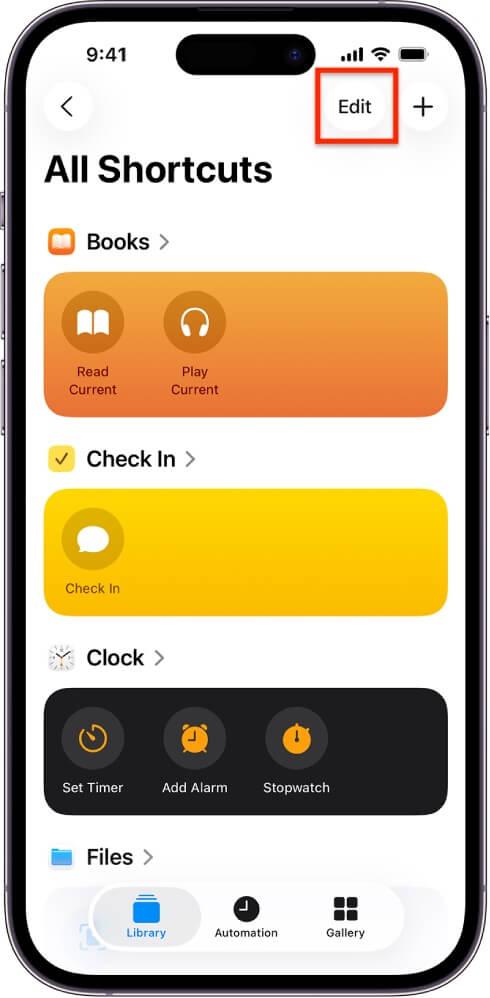
Or touch and hold the shortcut. Tap Delete. Tap Delete Shortcut again to confirm.
f you're unsure which shortcut caused the issue, consider deleting recently added or suspicious shortcuts.
Step 2: Restore Your iPhone Settings to Normal
After deleting the shortcut, you may need to manually reverse the settings it changed.
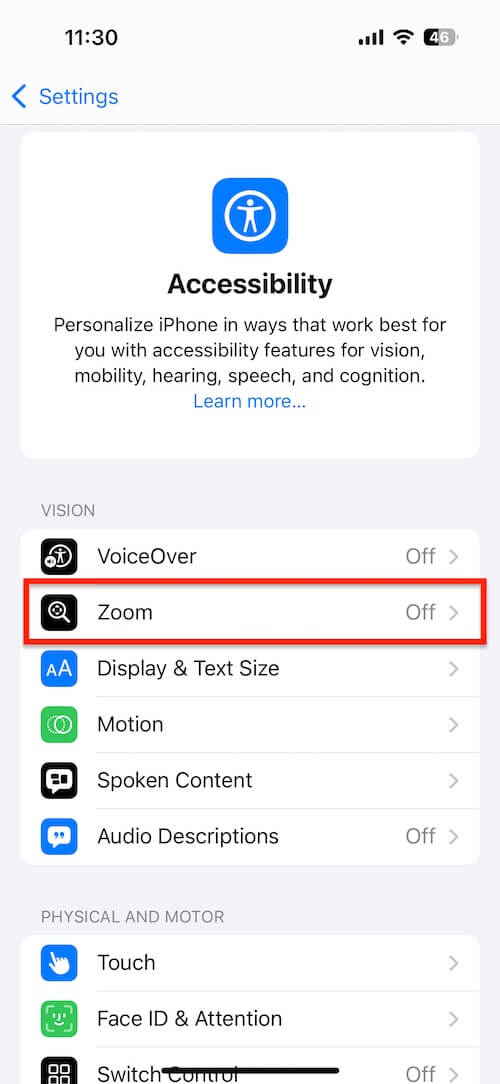
Turn Off Screen Zoom:
1. Open Settings. Tap Accessibility. Tap Zoom. Turn Zoom off.
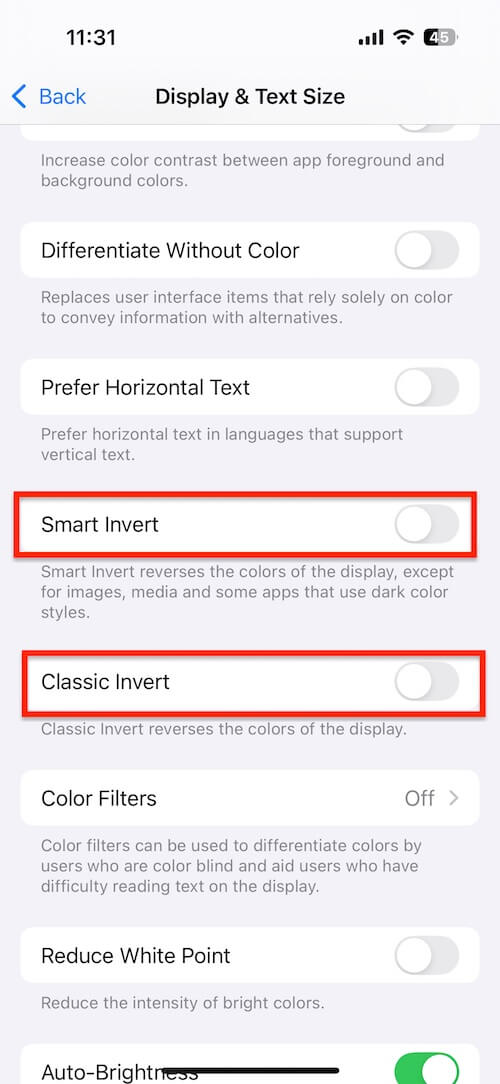
Disable Inverted Colors:
1. Open Settings. Tap Accessibility. Tap Display & Text Size. Turn off Smart Invert and Classic Invert if enabled.
Stop the Mooing Sound:
If the shortcut is still running, force-close the Shortcuts app and restart your iPhone. Once the shortcut is deleted, the sound should stop.
How to Fix Other Malicious Shortcut Variants
The Moo Virus is just one example of a prank shortcut. Other versions may change different settings, trigger sounds, enable accessibility features, or perform unwanted actions.
If you continue experiencing unusual behavior after deleting shortcuts, you can reset your iPhone settings. This will restore system settings to their default values without deleting your photos, videos, apps, or personal data.
How to Reset All Settings:
1. Open Settings- >General ->Transfer or Reset iPhone. Tap Reset ->Select Reset All Settings.
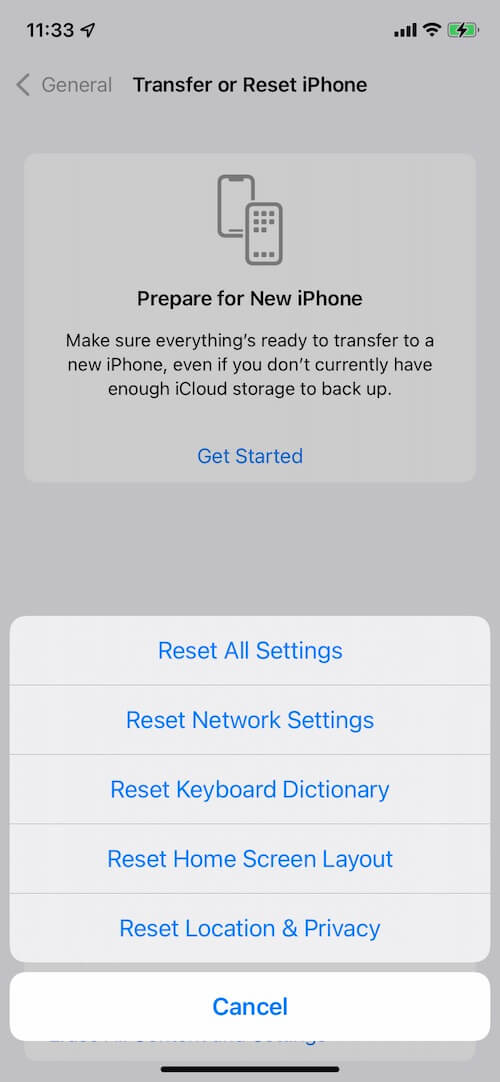
Your iPhone will restart and restore all settings to their default state.
How to Avoid Malicious Shortcuts in the Future
To protect your iPhone from prank or malicious shortcuts:
• Only install shortcuts from trusted sources.
• Review all shortcut actions before running them.
• Avoid opening unknown iCloud shortcut links
• Delete shortcuts you no longer use
• Keep iOS updated to the latest version.
Final Thoughts
The "Moo Virus" is not a real iPhone virus. It is typically a prank shortcut that changes accessibility and display settings, causing screen zoom, color inversion, and mooing sounds. By deleting the malicious shortcut and restoring your iPhone settings, you can quickly return your device to normal operation.
If the issue persists, resetting all settings on your iPhone can help remove the effects of any remaining malicious shortcut configurations.
| More Related Articles | ||||
 |
1. How to Edit Video and MP4 Metadata on iPhone and iPad? 2. How to Rename Photos on iPhone Without a Computer? |
|||
About Fireebok Studio
Our article content is to provide solutions to solve the technical issue when we are using iPhone, macOS, WhatsApp and more. If you are interested in the content, you can subscribe to us. And We also develop some high quality applications to provide fully integrated solutions to handle more complex problems. They are free trials and you can access download center to download them at any time.
| Popular Articles & Tips You May Like | ||||
 |
 |
 |
||
| Five ways to recover lost iPhone data | How to reduce WhatsApp storage on iPhone | How to Clean up Your iOS and Boost Your Device's Performance | ||