When you rip, convert, download, or transfer MP4 videos, the files may lose important metadata information such as the title, artist, album, keywords, description, artwork, and more. In some cases, the video may also contain an incorrect creation date and time, or display the file import date instead of the original shooting date.
Editing video metadata helps you better organize your video library and protect your privacy. You can manually add or modify metadata including:
• Add custom titles, artists, albums, and descriptions.
• Insert eye-catching video artwork and thumbnails.
• Correct video creation dates and timestamps.
• Remove sensitive GPS location tracking data, camera serial numbers, and author info before sharing.
On Mac and Windows computers, applications such as Apple Photos and VLC Media Player provide limited video metadata editing features. However, these tools are not fully available on iPhone and iPad. In this guide, you will learn how to use Media MetaX to edit MP4 and video metadata directly on your iPhone and iPad.
Why Use Media MetaX?
Media MetaX is a professional video metadata editor for iPhone and iPad. It allows you to view, edit, and remove video metadata without needing a computer.
The app supports editing metadata for MP4, MOV, M4V, and other video formats while also providing additional video management tools.
Key Features of Media MetaX
1. View Deep Technical and Tag Specifications. Gain full visibility into your video files by viewing hidden metadata details, including:
• Video title, description, and copyright details.
• Artist, album, director, and actor tags.
• Exact GPS coordinates (latitude, longitude, and altitude).
• Technical encoding details, resolution, and camera specifications.
2. Comprehensive Metadata Editing and Privacy Removal. Easily rewrite or completely erase metadata fields. You can strip out private information before uploading videos to social media to prevent doxxing or tracking:
• Privacy Shield: Erase GPS location data, camera make/model, camera serial numbers, and software footprint details.
• Creative Control: Change or insert custom photo cover images/thumbnails.
• Organization: Edit publisher, producer, and keyword tags for seamless sorting.
3. Advanced Video Utilities. Beyond tagging, Media MetaX includes a built-in suite of optimization tools:
• Fix Broken Timestamps: Instantly correct inaccurate creation and modification dates.
• Video Compressor: Shrink large video file sizes while retaining crisp visual quality.
• Format Converter: Seamlessly transcode videos between MP4, MOV, and M4V.
Step-by-Step: How to Change Video Metadata on iPhone and iPad
Step 1: Download and Install Media MetaX. Download the Media MetaX app from the official iOS App Store onto your iPhone or iPad.
Step 2: Allow Access to Your Photo Library. Open the app and allow it to access your Photos library so you can select videos from your device.
Step 3: Select a Video. Choose a video to view detailed video information and all metadata fields.
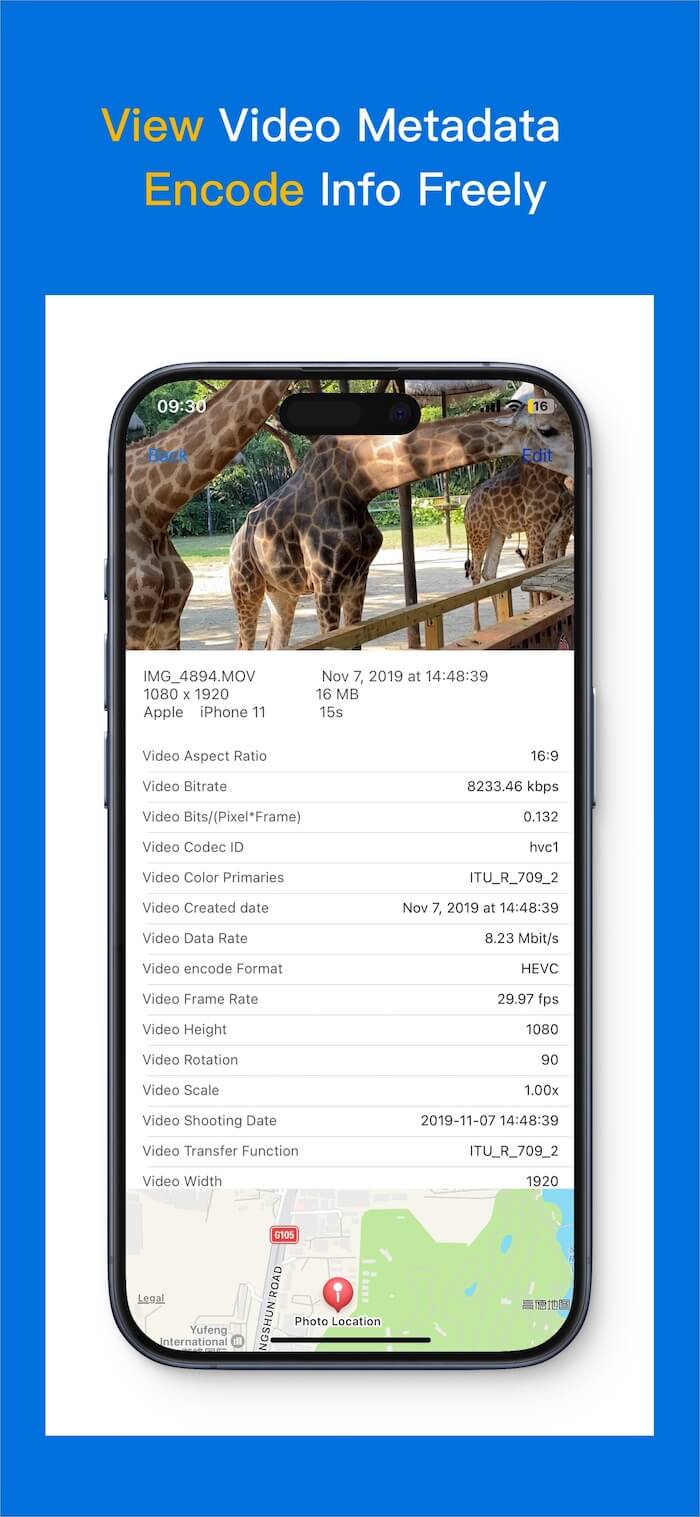
Step 4: Edit and Save Your Changes
1. Tap the Edit button located in the top-right corner of the screen.
2. Select any field you wish to alter (e.g., Filename, Title, Caption, Copyright, Created Date, Camera Model, or GPS coordinates).
3. Type in your custom information or clear out existing text to delete it.
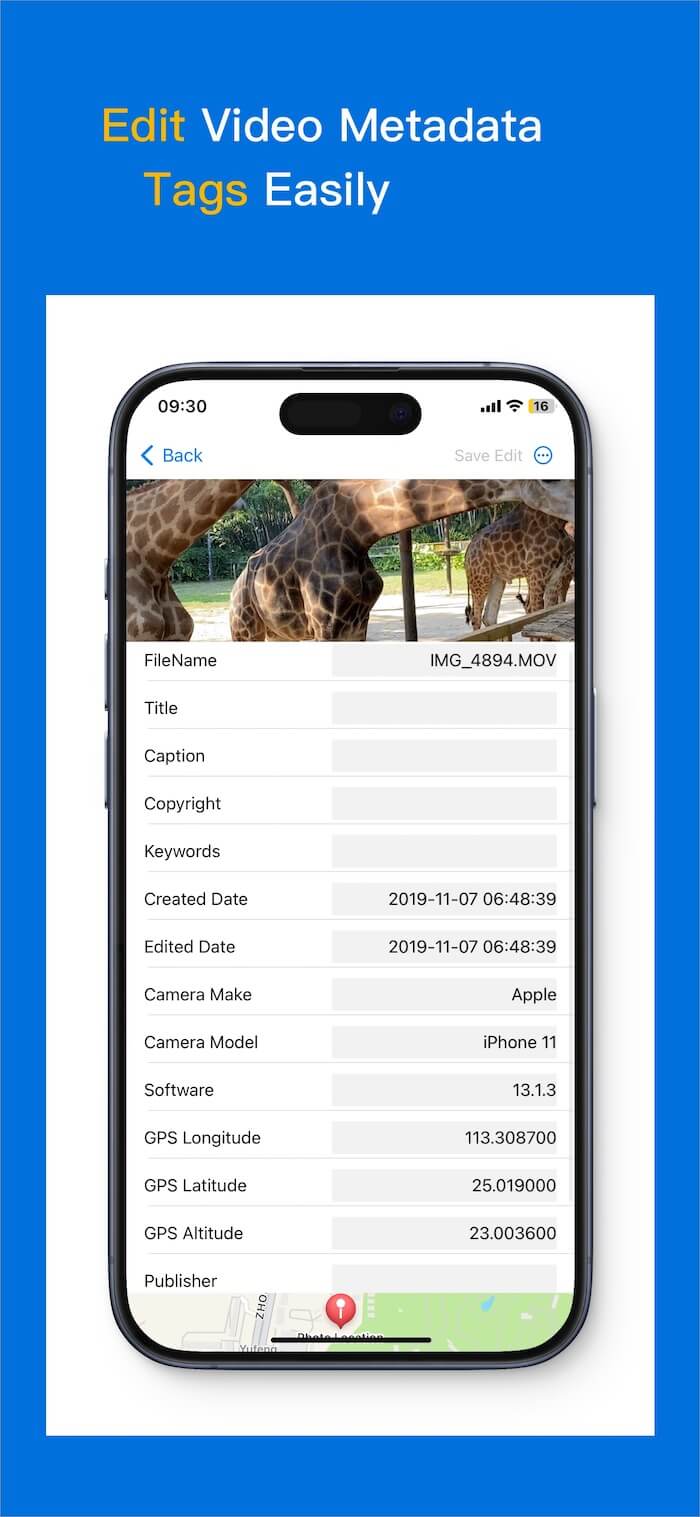
4. Once satisfied, tap Save Edit to commit the changes to the video file.
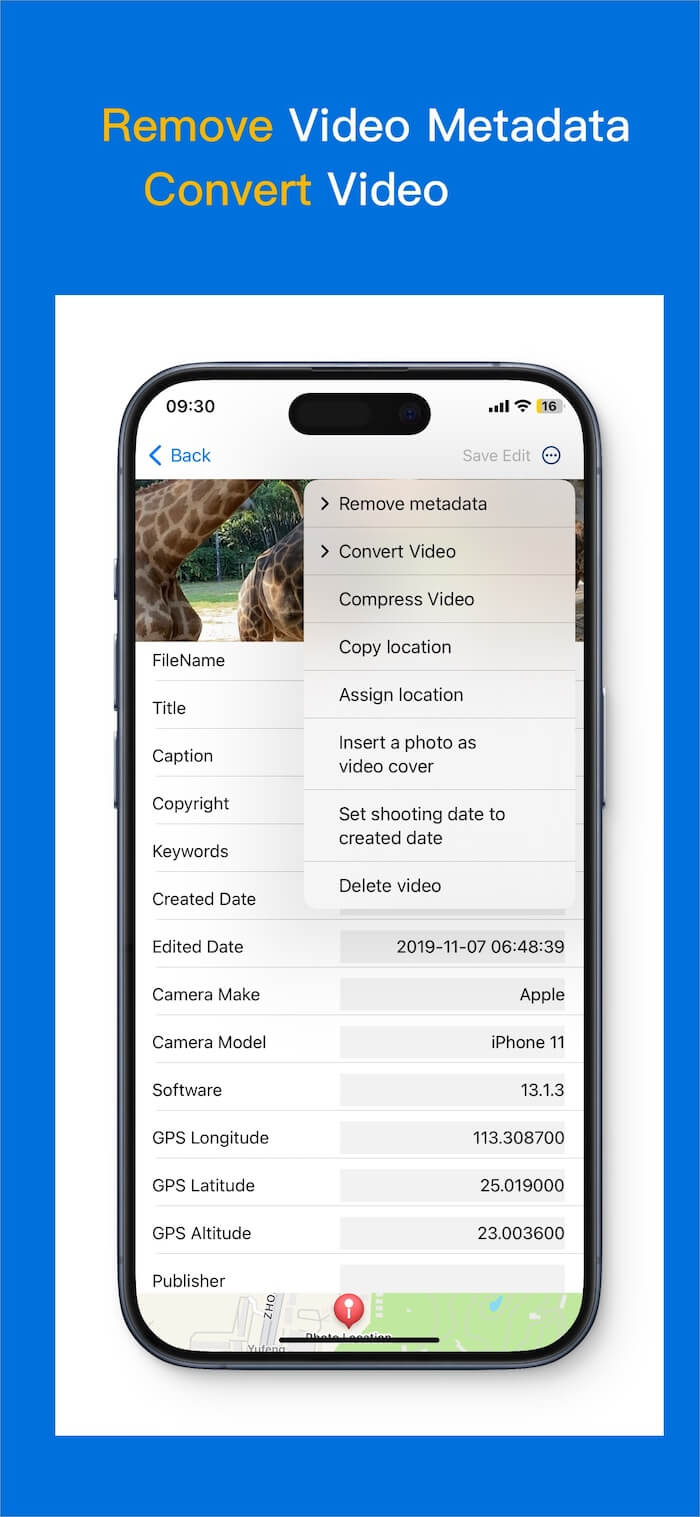
Step 5: Explore Advanced Options
Tap the three-dot menu (...) in the top-right corner to open a quick-actions panel. From here, you can batch-remove all metadata, copy/paste GPS coordinates to other videos, swap the thumbnail artwork, or compress the video file for easier emailing.
Final Thoughts
Manually editing video and MP4 metadata on an iPhone or iPad is the best way to clean up a messy media library, fix broken shooting dates, and protect your privacy from unwanted tracking data.
With Media MetaX, you don't need a desktop computer to take control of your files. You can rewrite tags, replace thumbnails, and scrub out sensitive GPS logs natively right from the palm of your hand.
| More Related Articles | ||||
 |
1. How to Edit Audio and MP3 Metadata on iPhone? 2. How to Rename Photos on iPhone Without a Computer? |
|||
About Fireebok Studio
Our article content is to provide solutions to solve the technical issue when we are using iPhone, macOS, WhatsApp and more. If you are interested in the content, you can subscribe to us. And We also develop some high quality applications to provide fully integrated solutions to handle more complex problems. They are free trials and you can access download center to download them at any time.
| Popular Articles & Tips You May Like | ||||
 |
 |
 |
||
| Five ways to recover lost iPhone data | How to reduce WhatsApp storage on iPhone | How to Clean up Your iOS and Boost Your Device's Performance | ||