ExifTool is the gold standard command-line utility for reading, writing, and editing metadata (EXIF, IPTC, and XMP) in photos and videos. However, for the average user, ExifTool can be intimidating. Operating within the Terminal requires precise command syntax; a single typo can lead to overwritten data or corrupted files.
Users must also understand metadata tag names and command syntax, which can be confusing for beginners. To bridge the gap between power and usability, many people turn to ExifTool GUI applications. These apps provide a visual interface that makes metadata management as simple as clicking a button.
In this article, we will recommend the best ExifTool GUI apps to edit photo metadata on Mac, iPhone, and iPad.
Best ExifTool GUI for Mac: Photo Exifer
Mac users often manage photos in two distinct ways: through the integrated Apple Photos Library or via standard Finder folders. Therefore, a good ExifTool GUI should support both scenarios.
Photo Exifer is a powerful ExifTool-based GUI application designed for macOS. It supports editing metadata for photos stored in the Apple Photos library as well as photos saved in regular folders outside the library.
Photo Exifer includes nearly all ExifTool metadata editing capabilities, allowing users to view, edit, copy, and remove metadata such as EXIF, IPTC, and XMP tags. In addition, it provides many advanced tools that simplify photo management on Mac, including:
• Merge Google Takeout photos and their sidecar files
• Add date and time stamps to photos
• Edit iCloud photo metadata in the Photos library
• Find duplicate photos in the Photos library
• Rebuild missing reference files in a photo library
• Merge multiple Apple Photos libraries
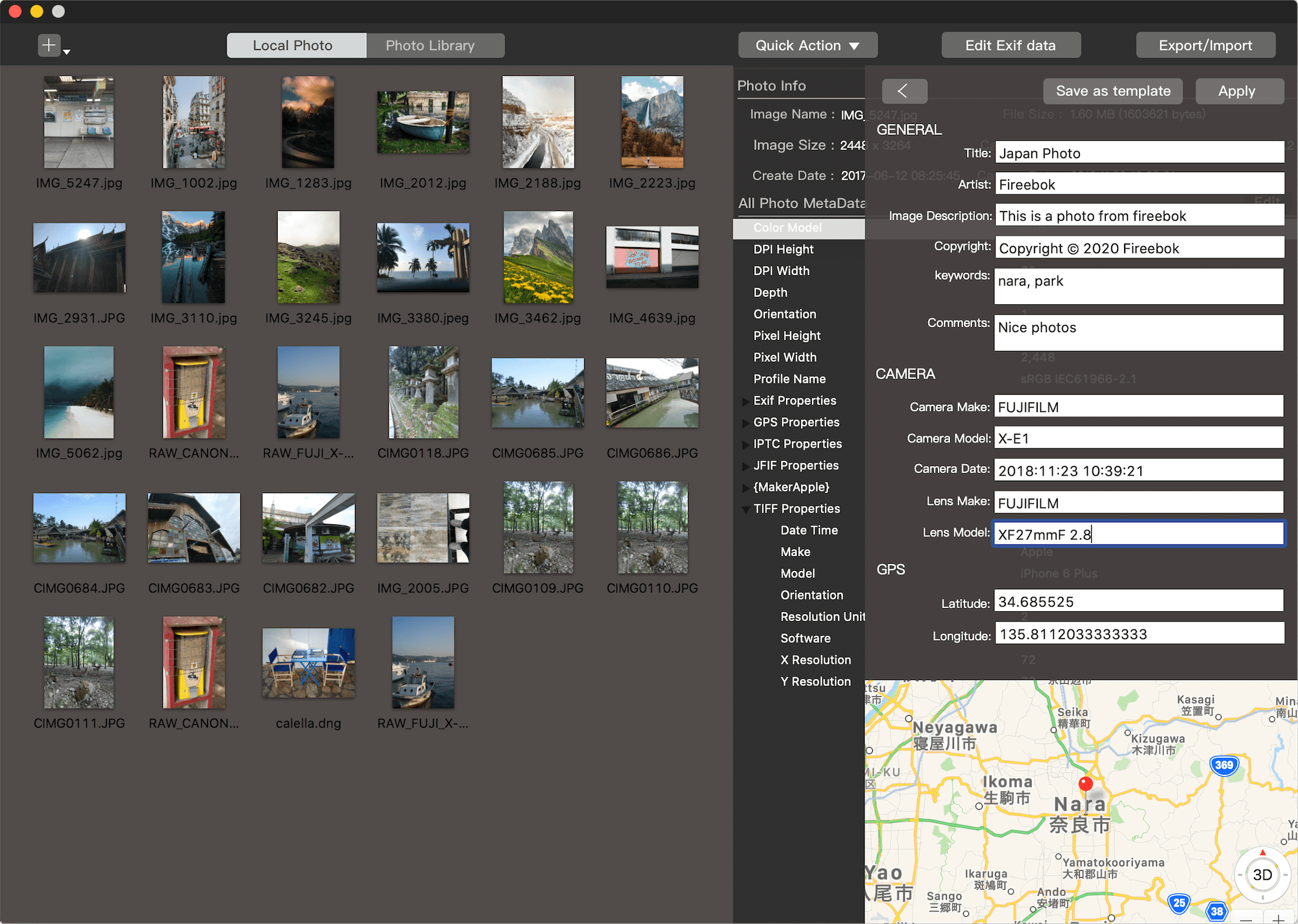
If you are looking for a powerful ExifTool GUI for Mac, Photo Exifer is an excellent choice. It offers rich metadata editing features and convenient photo management tools that go far beyond the basic functionality of the ExifTool command-line tool.
Best ExifTool GUI for iPhone and iPad
Unlike macOS, iOS and iPadOS do not support command-line tools such as ExifTool. If you need to manage metadata on mobile, you have two primary options:
1. Sync via iCloud (The Mac-to-Mobile Workflow)
The most robust way to manage mobile metadata is to edit your photos on a Mac using Photo Exifer. Because iCloud Photos syncs metadata across all devices under the same Apple ID, your edits will appear instantly on your iPhone and iPad.
2. Direct Mobile Editing: Photos Exifer for iOS
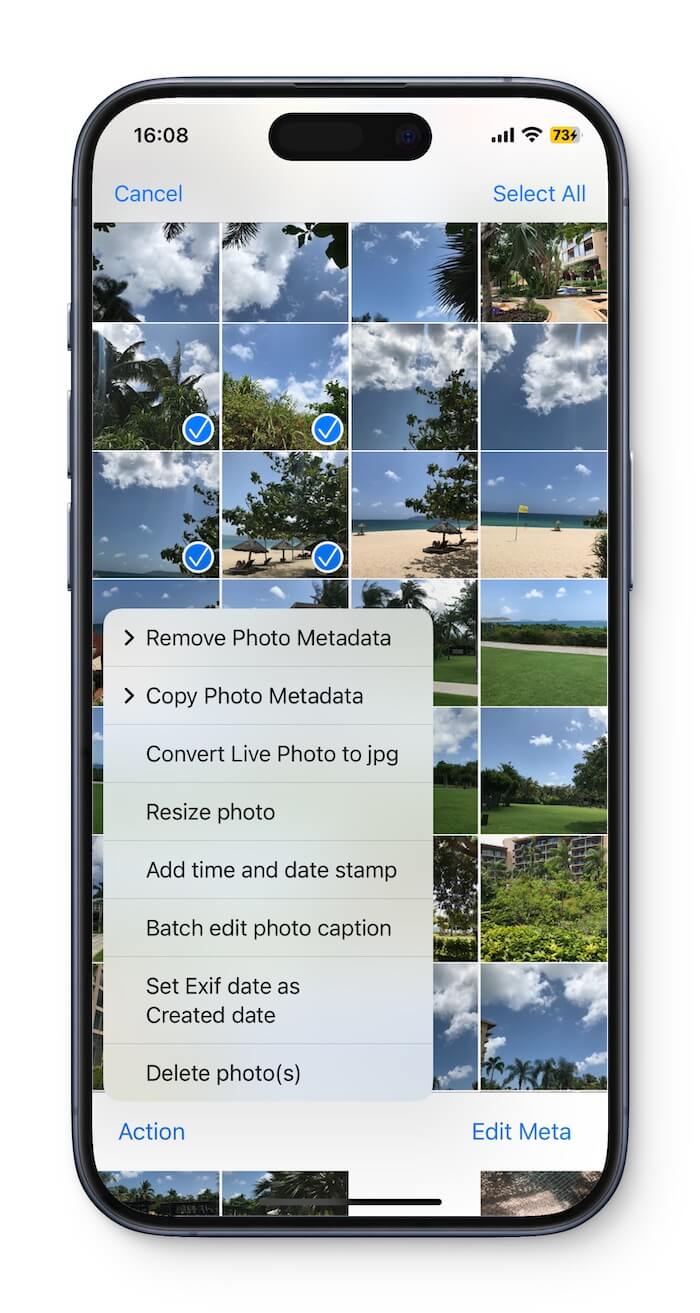
If you prefer a mobile-first workflow, Photos Exifer (the iOS version) provides a streamlined metadata toolkit designed for touchscreens. While Apple’s native Photos app allows for minor date and location tweaks, Photos Exifer goes much deeper.
Key Features for iPhone and iPad:
• View detailed photo metadata
• Batch edit metadata for multiple photos
• Remove metadata such as EXIF, IPTC, and XMP
• Copy metadata between photos
• Resize photos
• Find duplicate photos
• Sort photos by file size
• Find photos without captions
• Find photos not included in albums
Final Thoughts
While the ExifTool command line is powerful, it isn't the most efficient way for most people to work. Whether you are cleaning up a messy Apple Photos library on your desktop or protecting your privacy on the go, using a dedicated photo metadata editor like Photo Exifer provides the perfect balance of professional-grade power and user-friendly design
| More Related Articles | ||||
 |
1. How to View and Remove Video Metadata on iPhone? 2. How to Fix Photos Showing the Incorrect Date on iPhone? |
|||
About Fireebok Studio
Our article content is to provide solutions to solve the technical issue when we are using iPhone, macOS, WhatsApp and more. If you are interested in the content, you can subscribe to us. And We also develop some high quality applications to provide fully integrated solutions to handle more complex problems. They are free trials and you can access download center to download them at any time.
| Popular Articles & Tips You May Like | ||||
 |
 |
 |
||
| Five ways to recover lost iPhone data | How to reduce WhatsApp storage on iPhone | How to Clean up Your iOS and Boost Your Device's Performance | ||